
 Monday to Friday (excluding public holidays) from 8am to 6pm
Exporting to the USA: customs and regulatory requirements to anticipate
Customs regulations applicable to shipments to the United States are subject to regular changes. To prevent your parcels from being held up at customs and ensure successful delivery to your recipients, it is essential to prepare your shipments with complete, accurate, and up-to-date information from the moment of postage. This page guides you through the key points to be aware of before shipping to the United States, and will be updated as regulations evolve.
The information, rates, and terms presented on this page are subject to change at any time without notice. Our teams regularly monitor these changes to update the information on this page.

🔔 Changes to Customs Duties Applicable to Your Shipments to the United States
As of July 24, 2026, new Section 301 customs duties, known as the “Forced Labor Tariff,” have taken effect in the United States, replacing the temporary Section 122 surcharge.
This change affects goods imported into the United States from 60 countries and alters how customs duties are calculated for your shipments.
Key Takeaways
- The general customs duty rate - also known as the MFN (Most Favored Nation) rate - continues to apply based on the product and its country of origin.
- Additional Section 301 tariffs apply to the 60 targeted countries, in addition to the general/MFN rate.
- The Section 301 tariff is capped for goods originating in the European Union, Taiwan, Japan, South Korea, and Switzerland.
- Products already subject to Section 232 duties - including certain steel and aluminum products, certain automobiles, and certain auto parts retain their current treatment. Only the general/MFN and Section 232 rates apply.
- Products eligible for an exemption also retain their current treatment.
Step 1:
Check whether your products are subject to specific regulations
Are your products subject to CPSC regulations?
The U.S. Consumer Product Safety Commission (CPSC) oversees the importation of many finished consumer products into the United States. If your items fall within its scope, an additional requirement applies from July 8, 2026.
Products covered by the CPSC – 16 CFR standard include, in particular:
- toys and children's articles,
- electrical or consumer electronics goods,
- sporting goods,
- household or decorative products,
- textile products containing components subject to certification.
Find the list of HS codes covered by this regulation here.
However, unassembled spare parts, products temporarily imported for repair, and gifts exchanged between private individuals are not within scope.

Customs duties applicable to your shipments
1/ Application of the General Tariff Rate
Every product imported into the United States is subject to a general tariff rate.
This rate, also known as the general/MFN rate, varies depending on the product type and the country of manufacture.
You can look up the general/MFN rate applicable to your goods directly on the U.S. HTS website.
2/ Application of an Additional Section 301 Duty
The United States imposes an additional duty on goods manufactured in 60 targeted countries for failing to prohibit or effectively enforce the prohibition of imports of products made with forced labor.
This Section 301 duty is added to the general/MFN rate applicable to the product.
| A rate of 10 % | A rate of 12,5 % |
|---|---|
A 10% Section 301 tariff applies to goods manufactured in the following countries: Argentina, Bangladesh, Cambodia, Canada, Ecuador, El Salvador, Guatemala, Honduras, India, Indonesia, Jordan, Malaysia, Mexico, Pakistan, Sri Lanka, Trinidad and Tobago, and the United Kingdom. The European Union and Taiwan are also subject to a 10% rate, with a cap mechanism (details below). Example of a product manufactured in Canada: | A Section 301 rate of 12.5% applies to goods manufactured in the following countries and territories: Algeria, Angola, Australia, the Bahamas, Bahrain, Brazil, Chile, China, Colombia, Costa Rica, the Dominican Republic, Egypt, Guyana, Hong Kong, Iraq, Israel, Kazakhstan, Kuwait, Libya, Morocco, New Zealand, Nicaragua, Nigeria, Norway, Oman, Peru, the Philippines, Qatar, Russia, Saudi Arabia, Singapore, South Africa, South Korea, Switzerland, Taiwan, Thailand, Turkey, the United Arab Emirates, Uruguay, Venezuela, and Vietnam. Japan, South Korea, and Switzerland are also subject to a 12.5% rate, with a cap mechanism (details below). Example of a product manufactured in China: |
3/ Section 301 Duty Caps
For goods manufactured in the European Union, Taiwan, Japan, South Korea, and Switzerland, the Section 301 duty is capped and not applied at a flat rate.
The applicable caps are as follows:
10% for the European Union and Taiwan;
12.5% for Japan, South Korea, and Switzerland.
| If the general/MFN rate is below the Section 301 ceiling | If the general/MFN rate is above the Section 301 ceiling |
|---|---|
If the general/MFN rate is lower than the Section 301 ceiling, the general rate is added to the Section 301 rate, up to the applicable ceiling. Example of a product manufactured in the European Union: MFN rate: 7% Section 301: 10% Total applied duty: 10% Example of a product manufactured in Switzerland: MFN rate: 1% Section 301: 12.5% Total applied duty: 12.5% | If the general/MFN rate is higher than the Section 301 ceiling, only the general/MFN rate applies. Example of a product manufactured in the European Union: MFN rate: 11.8% Section 301: 10% (not applied) Total applied duty: 11.8% Example of a product manufactured in Switzerland: MFN rate: 15% Section 301: 12.5% Total applied duty: 15% |
4/ Products Already Subject to Section 232 Duties
Products already subject to Section 232 duties are exempt from the new Section 301 measures.
This applies in particular to certain categories of steel, aluminum, automobiles, and auto parts.
For these products, the specific Section 232 tariffs continue to apply in addition to the general/MFN rate.
Example of a product manufactured in China containing brass:
MFN rate: 5%
Section 232 tariff: 200%
Theoretical Section 301 tariff: 12.5% (not applied)
Total applied duty: 205%
5/ Products Eligible for Exemption
Products included in the exemption lists published by U.S. authorities continue to be subject to their current treatment.
Example of an exempt product:
MFN rate: 0%
Theoretical Section 301 duty: 0%
Total applied duty: 0%
Important: the amount of customs duties and taxes is added to the shipping cost and must be factored into your export pricing policy.
Step 2: Choose your shipping method
For your shipments to the United States, Colissimo offers two shipping methods:
- With the DDP option (Delivered Duty Paid), customs duties and taxes are advanced by FedEx to the American customs authority, then recharged to you by Colissimo. Your customers receive their parcels with no additional charges at delivery. This is the most seamless option for the customer experience.
- With DAP (Delivered At Place), customs duties and taxes are billed directly to the recipient by FedEx at the time of delivery.
Important: regardless of the shipping option chosen, customs formalities are identical and must be strictly observed. An incorrect or incomplete customs declaration will result in the parcel being held by US customs.
Step 3: Prepare your documents and data
Mandatory data for all your shipments

The United States requires a very precise and complete customs declaration for each parcel. Whichever postage solution you use (Web Service, ColiShip online postage tool, or one of our CMS modules), you must provide the following information without fail:
- The shipper's EORI number in SIREN format (FR + 9 digits). This format has been mandatory since July 1, 2026. As a result, the SIRET format is no longer accepted by French customs: all packages listed with an EORI SIRET number number will be held at customs, with a risk of delivery delays and financial penalties related to parcel storage by your Pôle d'Action Économique. If you do not yet have an EORI SIREN number, contact your Pôle d'Action Économique or apply for one now here. (It is also advisable to add your VAT number in the Customs Reference field.)
- The recipient's mobile phone number
- The name of the State or Province corresponding to the delivery address
- The entry of 10-digit HS codes
- The designation and very detailed composition of each item, mandatorily in English
The country of manufacture of each item (not the country of dispatch), using the MID code or the full name and address of the manufacturer after each item description, in the case of different manufacturers. For a single manufacturer, refer to the specificities of your postage solution below.

Simply update your Colissimo API and follow the guidance above.
What’s changing:
- The EORI field
- The mobileNumber field
- The stateOrProvinceCode field
- Entry of 10-digit HS codes
Use the "Comments" field to specify the MID code or the name of a single manufacturer. Consult the latest version of the technical documentation >

The ColiShip postage tool allows you to complete all mandatory fields and follow the shared guidelines above.
- The shipper's EORI number
- The recipient's mobile phone number
- The State of the delivery address
- Entry of 10-digit HS codes
Use the "Observation" field to specify the manufacturer's MID code or the name/address of a single manufacturer.

Your usual Colissimo module (Magento, PrestaShop, Shopify, WooCommerce, Wix) allows you to complete all mandatory fields and follow the shared guidelines above.
- The shipper's EORI number
- The recipient's mobile phone number
- The State of the delivery address
- Entry of 10-digit HS codes
Whether you have one or several manufacturers, add the MID code or the full name and address of the manufacturer after each item description.
Additional data for products subject to CPSC regulations
As of July 8, 2026, your products are subject to CPSC regulations; you must submit compliance data electronically prior to shipment and before the goods enter the United States, using the eFiling process.

Option 1: You regularly ship to the United States
Tip: to simplify your declarations, register your products now in the CPSC Product Registry. Once your references are registered, the data to be submitted for each item in the parcel is limited to: the product identifier (Product ID), the certifier identifier (Certifier ID), the version identification (Version ID).
Where should you enter this information when preparing your shipments ?
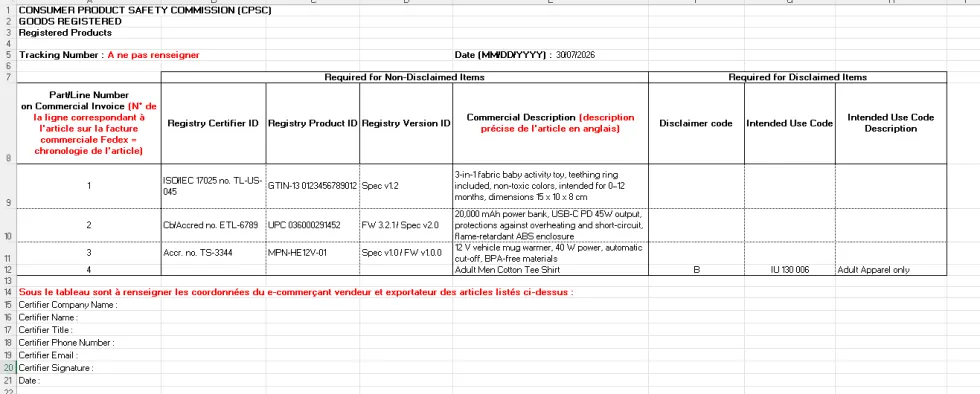
You must upload a CPSC supplementary form for each package in your postage tool when preparing your shipment. This form must include, for each item, the information required by CPSC regulations. Download the blank form here for goods already registered in the CPSC (3 pieces of information to provide per item). Please note: the “Tracking Number” field should not be filled out; the “Commercial Description” column must be completed in English; and the contact information requested below the item table refers to the e-commerce seller and exporter.
Example :
Option 2: You occasionally ship to the United States
Seven items are required for each shipment in question if you choose not to register your products with the CPSC Product Registry:
- Global Trade Item Number (product identifier, e.g., GTIN)
- Date of manufacture of the finished product
- Each CPSC rule for which the product has been certified under Part 1110 of Title 16 of the CFR
- Name and full address of the manufacturer, producers, or assemblers
- Date of the most recent test for compliance with applicable CPSC rules
- Name and full address of the compliance testing facilities
- Contact information and details of the organization that maintains records of compliance test results
Where should you enter this information when preparing your shipments?
You must upload a CPSC supplementary form for each package in your shipping software when preparing your shipment. This form must include, for each item, the information required by CPSC regulations. Download the form for goods not registered with the CPSC here. Please note: Do not fill in the “Tracking Number” field, and descriptions must be in English.
Special case: the "Disclaim Message Set"
If a product is ultimately not regulated by the CPSC but is potentially flagged as such by the customs system, a "Disclaim Message Set" must be submitted. The Disclaim allows you to officially declare to customs that the product falls outside the CPSC's scope. The absence of information is interpreted as missing data, not as an exemption, which may result in: a hold, a suspension, or a request for additional information.
The Disclaim confirms that:
- the product is not regulated by the CPSC (Disclaimer Code A)
- or the data is not required under the agency's guidelines (Disclaimer Code B)
The "Disclaim Message Set" must include a non-applicability code (Disclaimer Code A or B) and an Intended Use Code.
Attention to fees in the event of a hold: in the absence of a compliant eFiling declaration, your affected shipments may be held at customs. Storage fees may then be applied by the US authorities, at a rate of $0.08 USD per kilogram per working day of storage, of storage after the first 5 days, until the situation is resolved.
👉 CPSC – eFiling programme details
To help you with this process:
- List of applicable HS codes as of January 31, 2026
-Register your affected products with the CPSC Product Registry
-List of CPSC-accredited testing laboratories in France
Additional resources to help you understand CPSC régulations :
-Link to the CPSC's YouTube channel (registration help)
-Regulatory assistant to guide you through CPSC requirements
- FedEx CPSC FAQ in English
How do I submit the supplementary form ?
You must upload the supplementary form to your Colissimo postage solution when preparing to frank your package:
- In the Web Service for postage and in the e-commerce modules
Use the Documents Web Service to upload this supplementary form by selecting the “Other” category
- On Coliship
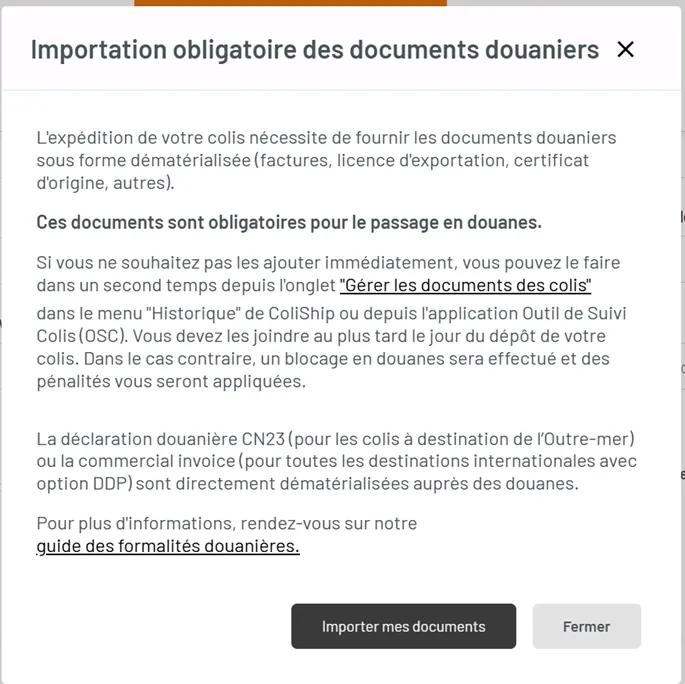
Upload the supplementary form immediately by clicking the “Import my documents” button in the pop-up window that appears once you’ve completed the postage process:
Step 4: Ship with Colissimo and FedEx

Once your parcels are prepared and compliant with US requirements, Colissimo routes your shipments to the United States in partnership with FedEx.
For each shipment, FedEx provides:
- 100% digital customs clearance: only the shipping label needs to be affixed to the parcel — there is no need to print the customs declaration ("commercial invoice")
- Home delivery
- An interactive notification with collection point delivery available on request from the recipient for any parcel up to 3 kg
- A committed transit time of 5 working days to the United States
Useful resources: